A Smarter Way to Mount Directional Outdoor Antennas
The Challenges of Setting Up a Directional Cellular Antenna
If your business relies on a cell phone signal booster or fixed wireless access for better connectivity, the outdoor antenna has to be aimed correctly to work at its best. With traditional directional antenna mounting, that usually means someone has to climb onto the roof or up a pole, check signal strength, point the antenna toward a nearby cell tower, make small adjustments, and repeat the process until performance improves. The more directional the antenna, the more precise that aim needs to be.
The problem is that signal conditions can change. New construction, seasonal foliage, tower updates, and network changes can all affect which direction delivers the strongest usable signal. When that happens, your antenna may need to be adjusted again. Cellular Path's Smart SOCA and No-Modem SOCA bring automated antenna mounting to this process, helping scan, aim, and adjust an outdoor directional antenna from the ground.
Meet the SOCA: What It Is and How It Works
SOCA stands for Self-Optimizing Cellular Antenna, but the SOCA unit itself is not the antenna. It is a smart, motorized mount that works with an outdoor directional cellular antenna, such as a panel, Yagi, LPDA, or parabolic grid antenna. Once installed, SOCA automatically rotates and aims the antenna to help your cell phone booster or fixed wireless access system find the best available signal.
Everything is controlled through the CellularPath App. After the antenna and SOCA are mounted, the app walks you through setup and lets you run a signal scan. SOCA then turns the antenna in a full circle, checks signal at multiple points, and automatically points it toward the strongest available signal. You can also view signal readings in the app and run a new scan later if nearby construction, tower changes, or other conditions affect performance.
Because SOCA communicates with Cellular Path servers for remote control, it does require an internet connection. Depending on the model, that connection may be through WiFi or cellular.
|
Before You Buy Before choosing a SOCA system, keep these details in mind:
|
Two SOCA Models
Cellular Path offers SOCA in two versions: Smart SOCA and No-Modem SOCA. Both are designed to aim your outdoor directional antenna automatically, but they are built for slightly different use cases. The best choice comes down to your setup: a cell phone signal booster or a cellular router for fixed wireless access.
Smart SOCA: The Flexible Option (Antenna Not Included)
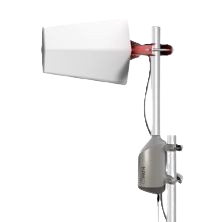
The Smart SOCA works with any cellular signal booster or cellular router, so it's a good fit for a wide range of business, commercial, and residential installations. It can connect through local WiFi, or use an active SIM card when local WiFi is not available or accessible. During a scan, Smart SOCA checks signal for all available carriers, making it especially helpful when you want to compare carrier performance or find the strongest signal available at a location.
No-Modem SOCA: The Streamlined Option (Antenna Not Included)
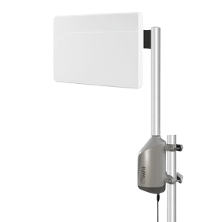
No-Modem SOCA is the more streamlined option for fixed wireless access. It is designed to work with select compatible routers, currently including the Teltonika RUT241, Teltonika RUTM50, and Peplink BR1 Mini. Instead of scanning every available carrier, it scans the carrier you select. It connects through WiFi and is best suited for dedicated FWA setups where the router and carrier have already been chosen.
Key Benefits of the SOCA
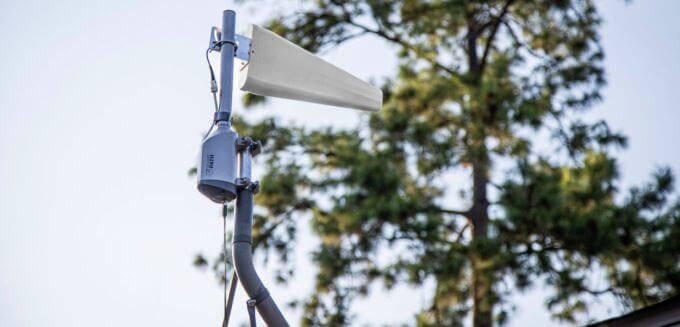
SOCA is designed to make directional antenna mounting easier, faster, and more manageable over time. For businesses, installers, and IT teams, the biggest advantage is not just stronger signal. It is less guesswork and less manual adjustment.
One Trip Up the Ladder
With a traditional directional antenna, installation may require several rounds of climbing, aiming, testing, and adjusting. SOCA simplifies that process. Once the antenna and SOCA are mounted, aiming can be handled through the CellularPath App from the ground.
Faster, More Precise Installation
SOCA replaces the manual adjust-and-check cycle with an automated signal scan. The system rotates the antenna, checks signal from multiple directions, and aims it toward the best available position. That helps the antenna start from a stronger, more accurate position without repeated trial and error.
Fewer Truck Rolls
For installers, integrators, and IT teams, remote adjustment can reduce costly site visits. If signal conditions change later, the antenna can be re-scanned and re-aimed through the app or web portal instead of sending someone back to the roof.
Multi-Site Management
The Cellular Path Portal supports multiple SOCA systems under one account. That makes it easier to monitor and control antenna positioning across multiple business locations, job sites, or commercial properties from anywhere.
Get the Aim Right the First Time
A directional cellular antenna can make a big difference for your cell phone signal booster or cellular router, but only when it is aimed correctly. SOCA helps take the guesswork out of that process by automatically scanning for signal, aiming the antenna, and making it easy to re-optimize later if conditions change.
If your business depends on reliable 5G/4G LTE cellular signal, you need your antenna working as efficiently as possible. SOCA gives you a smarter way to get more from your outdoor antenna without repeated manual adjustments. Shop the Smart SOCA or No-Modem SOCA online, or call our team at 1-800-470-6777 for help choosing the right option for your setup.
Interested in Learning More? Check Out Our Cellular Info Hub / WiFi Info Hub